How to Create a "Browser" in the Browser Sidebar — The Birth of Anything Copilot
In May 2022, Chrome introduced a sidebar feature supporting extensions and tool pages 1.
We soon discovered its limitations: users might need to access ChatGPT, DeepSeek, translation tools, or multiple pages simultaneously.
This inspired us to develop an extension addressing these needs — thus Anything Copilot was born.
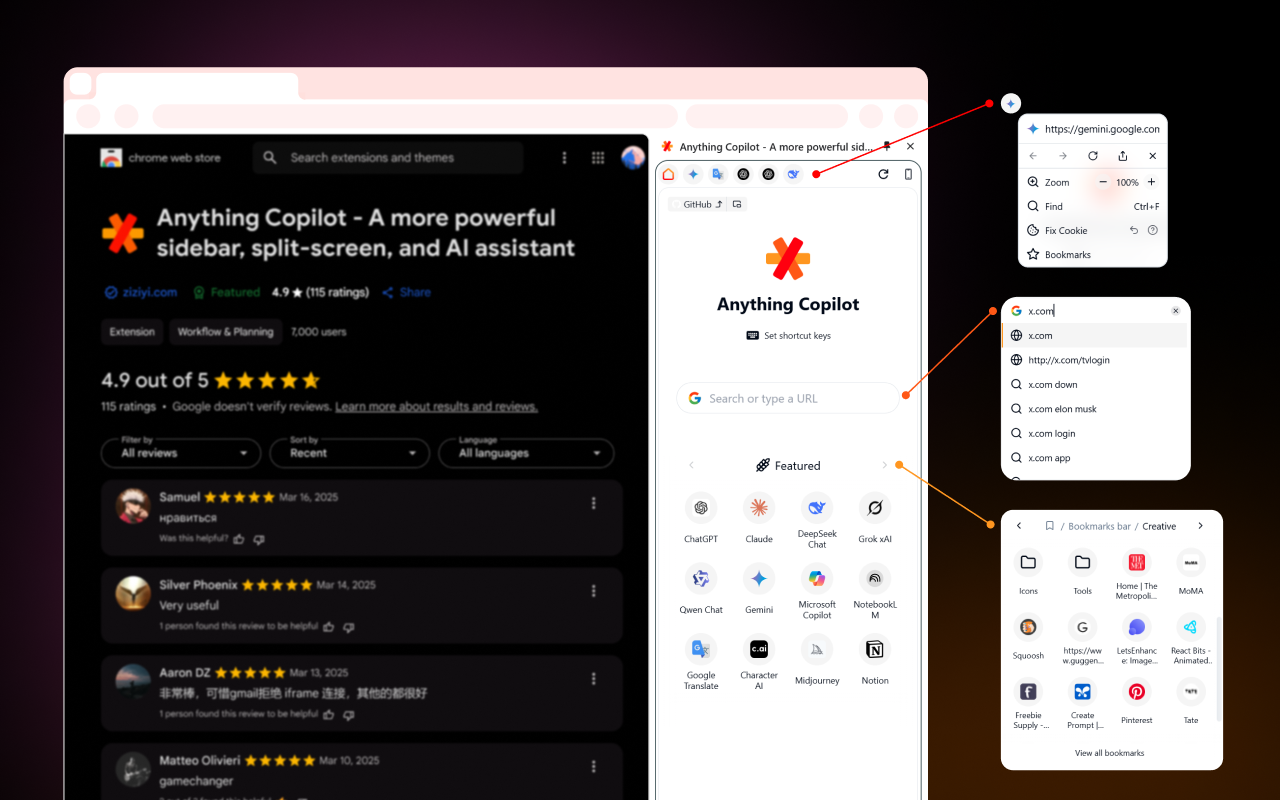
To display web pages in the sidebar, we had to use <iframe> since extensions lack native webview components.
Our challenge was to create a "webview-like" experience using iframes and Chrome extension APIs.
First technical hurdle: iframe limitations.
Pages can block embedding via CSP (Content Security Policy) or X-Frame-Options headers.
While restrictive, this security mechanism prevents clickjacking attacks (Clickjacking).
Our solution needed to bypass CSP/X-Frame-Options for specific iframes without compromising overall security.
The chrome.declarativeNetRequest API allowed header modification, but required precise targeting:
tabIds: -1restricts changes to the sidebar (not regular tabs)initiatorDomainslimits effects to our extension's domain
This approach maintained security while enabling our core functionality.
However, sidebar implementation required rebuilding browser features:
- Multi-tab switching
- In-page search
- Zoom controls
Through iterative updates, we gradually implemented these features, evolving Anything Copilot into a powerful sidebar companion.
Real-world use cases we love:
- Playing YouTube Music in the compact sidebar during work
- Using ChatGPT/Gemini for translation when replying to store reviews
Try Anything Copilot's sidebar experience yourself: